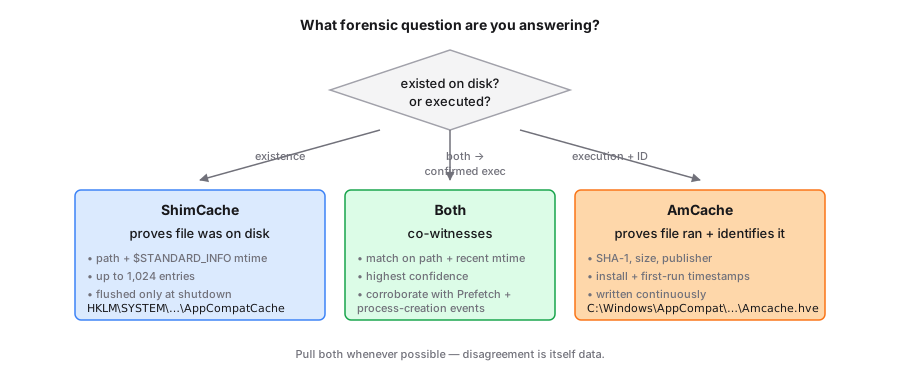
TL;DR. ShimCache proves a file existed on disk. AmCache proves it was executed and identifies it by SHA-1. ShimCache only flushes at clean shutdown. AmCache writes continuously. Pull both. They are co-witnesses, not substitutes.
Every junior analyst I have onboarded has asked the same question in the first week: "If AmCache is better, why do we still pull ShimCache?" The answer is that they record different events, at different times, with different failure modes. Treat them as substitutes and you will write reports that fall apart on the first technical review.
At a glance
| ShimCache | AmCache | |
|---|---|---|
| Registry location | HKLM\SYSTEM\CurrentControlSet\Control\Session Manager\AppCompatCache | C:\Windows\AppCompat\Programs\Amcache.hve |
| Capacity | Up to ~1,024 entries | Thousands of entries, no fixed cap |
| Per-entry data | Path, file mtime, (legacy) execute flag | Path, SHA-1, size, publisher, install date, much more |
| Written when | Only at clean shutdown | Continuously and on Appraiser task runs |
| Survives hard reboot | No, recent entries lost | Yes, already on disk |
| Best for | Proving a file existed on disk | Proving a file ran and identifying it by hash |
When the ShimCache wins
The cache fires on examination, not execution. That sensitivity makes it the better witness for files an attacker dropped briefly and then wiped. A binary that landed in C:\Users\Public\ at 14:33 and was deleted at 14:35 can still appear in the ShimCache if Windows touched it for any reason during that two-minute window.
The cache also carries the file's $STANDARD_INFORMATION mtime. That timestamp is not an execution time. It is a property of the file, which means it survives renames and copies that preserve metadata. Useful for clustering related builds across hosts. Useless for sequencing events on a timeline, as covered in what the ShimCache timestamp actually means.
When AmCache wins
Ask AmCache "did this binary actually run, and which exact binary?" and you get a real answer. Each InventoryApplicationFile entry under Amcache.hve carries a SHA-1 hash, file size, publisher, signing status, and a per-file LastWrite that proxies as "when Appraiser noticed this." That is enough to pivot to VirusTotal, to threat intel, or to other hosts in the estate even when the on-disk file is long gone.
The persistence model also wins. AmCache gets flushed by compattelrunner.exe on schedule and on installer events. Hard reboots and BSODs do not silently destroy recent activity the way they do for ShimCache. Pull Amcache.hve plus Amcache.hve.LOG1 and Amcache.hve.LOG2 to replay any in-flight transactions.
Using them together
Treat them as co-witnesses with different blind spots.
- Both present, paths match. Strong evidence of execution. Use AmCache for hash-based identity, ShimCache to confirm the file lived at that path at some point.
- ShimCache only. The file existed. Execution is not proven. Look for Prefetch, EVTX, or BAM/DAM corroboration.
- AmCache only. The host has not been cleanly shut down since the activity. ShimCache never flushed. Pull a RAM dump if the box is still up; the in-memory ShimCache is sitting there.
- Neither present, but you suspect activity. Check the Appraiser task ran. A disabled Compatibility Appraiser produces empty-looking AmCache hives.
For the technical layout details, see the Windows 10/11 binary format walkthrough. To parse a hive right now without installing anything, drop it into the Shimcache Parser. It runs entirely in the browser.
Further reading
- Eric Zimmerman's AppCompatCacheParser — reference C# implementation.
- Velociraptor's
Windows.Registry.AppCompatCacheartifact — live-system collection logic. - Mehrnoush's ShimCache & AmCache forensic analysis — case-driven walkthrough.