TL;DR. First u32 = header size, typically 0x30 through 0x36. At that offset each entry begins with the four-byte magic 10ts, followed by a 12-byte header and a variable-length body: UTF-16LE path (length-prefixed, not null-terminated), FILETIME mtime, and a trailing data blob. The execution flag was removed in Windows 10.
Every Windows release since XP has shipped a different AppCompatCache layout. The Windows 10/11 variant is the one investigators see most days, and it is the most forgiving once you know where the gotchas live. This is the walkthrough I wish I had when I first tried to hand-roll a parser.
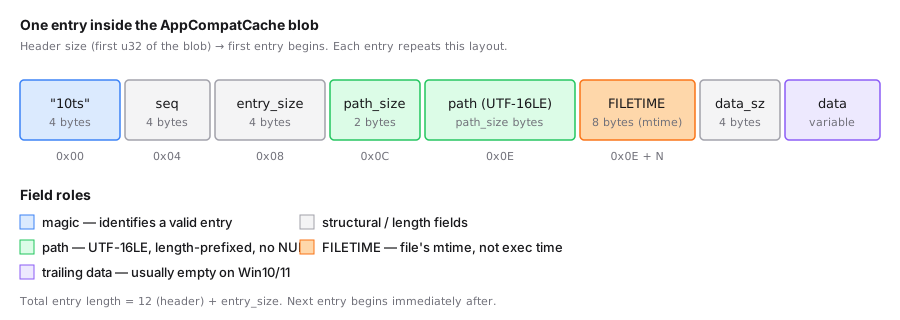
The blob you are parsing
Start with the binary value at:
HKLM\SYSTEM\CurrentControlSet\Control\Session Manager\AppCompatCache\AppCompatCache
Extract it from the SYSTEM hive (see where the ShimCache is stored). What you get is a single blob, typically tens to hundreds of kilobytes. Small header, then a sequence of entries, each starting with a known magic.
The header
The first four little-endian bytes of the blob are the offset of the first entry. On Windows 10/11 this is commonly 0x30, 0x34, 0x35, or 0x36, depending on the build. Some hives carry 0x80 here, which signals a Windows 8.x layout that still uses the 10ts / 00ts entry signature.
Do not hardcode the header size. Read the first u32 and validate that the byte at that offset is the start of a recognized entry. If neither 10ts nor 00ts shows up at the declared offset, scan forward for 10ts and pick up from there. Real hives ship slightly off-spec data, and a parser that bails on the first byte mismatch is a parser that loses cases.
A Windows 10/11 entry, byte by byte
Each modern entry starts with the four-byte signature 10ts (0x31 0x30 0x74 0x73). Full layout:
| Offset | Size | Field |
|---|---|---|
| 0x00 | 4 | Magic, "10ts" |
| 0x04 | 4 | Sequence / unknown, often ignored |
| 0x08 | 4 | Entry data size, bytes following this field |
| 0x0C | 2 | Path size in bytes (UTF-16LE) |
| 0x0E | N | Path bytes, UTF-16LE, no terminator |
| 0x0E + N | 8 | Last-modified time, FILETIME (100-ns since 1601-01-01 UTC) |
| 0x16 + N | 4 | Trailing data size |
| 0x1A + N | M | Trailing data, usually empty or small |
Total entry size is 0x0C + entry_data_size. Next entry begins immediately after.
Two practical notes:
- The path is UTF-16LE and is not null-terminated. Use the path-size field. Do not read until you hit a zero, you will eat the next entry's header.
- The
FILETIMEis the file's$STANDARD_INFORMATIONmtime. Not the time the program ran. Not the time the entry was inserted. The file's mtime, copied straight off NTFS at examination time. The proof-of-execution post covers why this matters.
What got removed in Windows 10
Earlier Windows versions packed an Executed flag inside each entry. Win7 and 8.x analysts learned to read it. Windows 10 removed it. Windows 11 did not put it back. There is no in-cache way to tell whether a binary actually ran. You need Prefetch, AmCache, or EVTX / Sysmon.
For the legacy field layouts (XP through 8.1), see legacy ShimCache formats.
Parsing in practice
A parser that survives review:
- Validates the four-byte magic at the offset advertised by the header.
- Iterates entries by reading the entry-data-size field and advancing.
- Decodes the path as UTF-16LE using the length prefix.
- Converts the
FILETIMEto whatever timestamp format your downstream tooling prefers. Unix milliseconds is convenient. ISO 8601 UTC is what reports actually want. - Surfaces the detected OS-format label (Windows 10/11 vs 8.x vs 8.0) for downstream filtering.
- Replays
SYSTEM.LOG1andSYSTEM.LOG2before reading the value. If your parser does not do this, it is reading a stale hive.
The open source Shimcache Parser implements steps 1 to 5 in Rust and ships to your browser as WebAssembly. It reads a single hive file and does not replay transaction logs, so run a dirty hive through rla.exe or Registry Explorer first. No server, no upload. Useful when the SYSTEM hive came from a regulated environment.
Further reading
- Eric Zimmerman's AppCompatCacheParser — gold-standard C# implementation covering every Windows variant.
- Mandiant's Shim Cache Parser — original Python proof-of-concept, useful as a format cross-reference.
- Velociraptor
Windows.Registry.AppCompatCache— VQL artifact for live collection. - Windows 10/11 AppCompatCache deep dive on Ø Security — the most thorough public write-up of the modern layout.