TL;DR. ShimCache lives at HKLM\SYSTEM\CurrentControlSet\Control\Session Manager\AppCompatCache\AppCompatCache. Windows rebuilds it in memory every session and flushes it to the SYSTEM hive only on clean shutdown. Hard reboots can drop recent entries entirely. Replay SYSTEM.LOG1 and SYSTEM.LOG2 before you trust what you read.
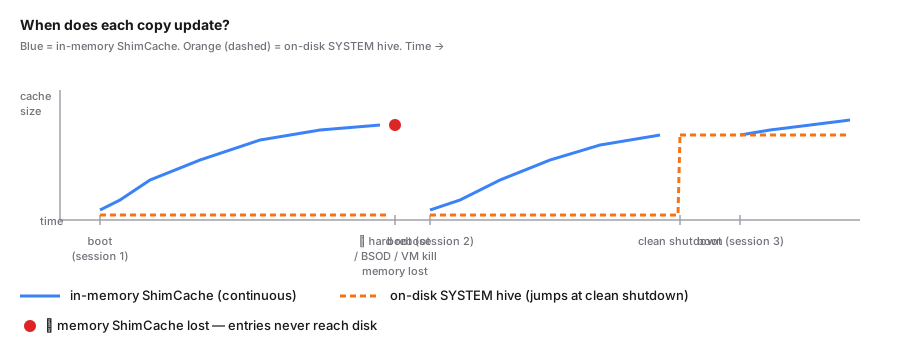
Most ShimCache misadventures trace back to the same root cause: the analyst thought the cache was updated like a log file. It is not. The cache lives in memory while the system is running, and the on-disk copy only ever reflects the state at the previous clean shutdown. Get that wrong and you write a report that says the host is clean when it is not.
The registry path
HKLM\SYSTEM\CurrentControlSet\Control\Session Manager\AppCompatCache\AppCompatCache
The trailing AppCompatCache is a value, not a subkey. The data is a single binary blob whose schema varies by Windows release. XP, 7, 8, 8.1, and the 10/11 family all use different layouts. The binary format walkthrough covers the modern Windows 10/11 schema in detail.
Offline, you pull the SYSTEM hive (one of the files under C:\Windows\System32\config\) and point a parser at it. Bring SYSTEM.LOG1 and SYSTEM.LOG2 with you. The Shimcache Parser reads the SYSTEM hive in the browser, with no upload, but it takes that single file and does not replay the logs. If the hive is dirty, replay .LOG1 and .LOG2 into it first with Eric Zimmerman's rla.exe (or load it in Registry Explorer and save the cleaned hive), then parse the result.
The ControlSet gotcha
Windows actually maintains multiple ControlSets, typically ControlSet001 and ControlSet002. At any moment exactly one is active, indicated by HKLM\SYSTEM\Select\Current. CurrentControlSet is a runtime alias for whichever one is active. On a live system it always resolves correctly; offline, you have to do the work yourself.
A defensible parser:
- Reads
HKLM\SYSTEM\Select\Current(a DWORD, usually 1 or 2). - Walks the corresponding
ControlSetXXX\Control\Session Manager\AppCompatCache\AppCompatCachevalue. - Falls back to scanning both
ControlSet001andControlSet002ifSelect\Currentis unreadable.
This tool, Eric Zimmerman's AppCompatCacheParser, and Mandiant's Shim Cache Parser all handle that resolution automatically. Roll your own at your peril.
When Windows actually writes
Here is the part that catches people. While Windows is running, the ShimCache lives in memory. The disk copy is written only at clean shutdown. So:
- A hard reboot, power loss, BSOD, or hypervisor-level VM kill destroys every entry that had not been persisted yet.
- A live triage with
reg.exeor RegRipper reads the previously-persisted value, not the cache currently being built in memory. - Volatility 3's
windows.shimcachememplugin against a RAM dump recovers the current in-memory cache. That is the only way to get the active session's entries off a host that has not been cleanly shut down.
If you arrive on a compromised box that has been hard-rebooted, the on-disk hive holds the cache from before the incident. Whatever the attacker ran in the active session is gone unless you also captured memory. The corroborating story usually has to come from AmCache, which writes continuously and survives the same reboot.
The transaction logs
SYSTEM.LOG1 and SYSTEM.LOG2 hold registry writes that have not been merged into the main hive yet. Any robust parser replays those logs before reading the ShimCache. If you copied just SYSTEM and skipped the logs, you are reading a stale view. This is the single most common acquisition mistake. The acquisition guide walks through the safe ways to grab all three.
Quick checklist
- ShimCache value:
HKLM\SYSTEM\CurrentControlSet\Control\Session Manager\AppCompatCache\AppCompatCache. - Active ControlSet selected by
HKLM\SYSTEM\Select\Current. - Stored in memory, flushed only at clean shutdown. Corroborate with AmCache for recent activity.
- Always replay
SYSTEM.LOG1andSYSTEM.LOG2before parsing.
Further reading
- Microsoft Learn: Registry hives — canonical reference for hive files and ControlSets.
- Mandiant's ShimCacheParser — original Python parser, useful as a format reference.
- Velociraptor
Windows.Registry.AppCompatCache— live-system collection logic.