TL;DR. Parse the SYSTEM hive. Filter for paths in user-writable locations (\AppData\, \Temp\) and unexpected system paths. Corroborate hits with AmCache hashes and Prefetch. Pivot on SHA-1 when the file is gone. ShimCache puts names on your hunt list. It does not close cases on its own.
The reason ShimCache earns its place in a hunting workflow is that it survives. An attacker drops a tool, runs it, deletes it, and the path still sits in the cache. That makes it a high-signal pivot when AmCache and Prefetch have been wiped or were never on. Here is how I actually use it.
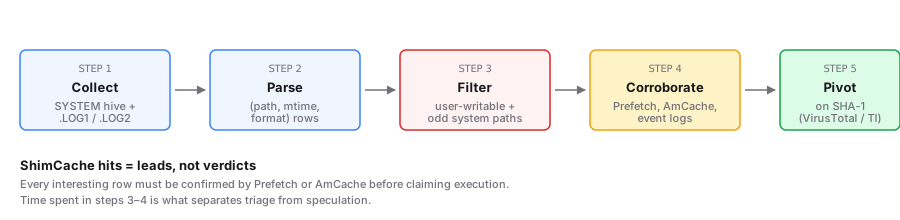
The workflow in five steps
- Collect the SYSTEM hive. Pull
C:\Windows\System32\config\SYSTEMand its.LOG1and.LOG2siblings, or use Velociraptor for live collection. The acquisition guide covers the safe methods. Remember the cache lives in memory until clean shutdown, so check storage timing before assuming the on-disk hive is current. - Parse to a flat list. Decode the binary blob into
(path, mtime, format)rows. The Shimcache Parser does this in your browser; Eric Zimmerman'sAppCompatCacheParseror Mandiant's Shim Cache Parser do it offline. - Filter for suspicious paths. This is where the hunt actually happens.
- Corroborate execution. A ShimCache row alone proves existence, not execution. Pair every interesting row with Prefetch, AmCache, or EVTX / Sysmon. The full matrix is in the program-execution artifacts reference.
- Pivot on hash. When the on-disk file is gone, AmCache's SHA-1 is your handle for VirusTotal and threat intel lookups. The ShimCache vs AmCache breakdown covers why you always pull both.
Patterns worth filtering for
These are the path patterns that consistently score highest in real hunts:
- User-writable directories.
\AppData\Local\Temp\,\AppData\Roaming\,\Users\Public\,\ProgramData\. Users and services can drop binaries here without admin rights, and they do. - System-writable-but-should-not-be.
C:\Windows\Temp\,C:\PerfLogs\, anything underC:\Windows\that is not a known Windows path. PsExec service binaries and named-pipe tooling land here all the time. - Double extensions and lookalikes.
svchost.exeoutside\System32\,lsass.exeanywhere unusual,*.pdf.exe,*.docx.exe. TheOriginalFileNamefrom AmCache usually breaks the disguise. - Network shares and removable media.
\\?\UNC\, drive letters that are notC:,\Device\HarddiskVolumeShadowCopy*. These show the staging path. Cross-reference with LNK files for shell history. - One-shot tooling.
psexec.exe,winrm.cmd,wmiexec.exe,mimikatz*.exe, Cobalt Strike artifacts. Legitimate admin tools get abused; treat them as findings to clear, not noise to ignore.
Do not get clever with regexes on the first pass. Sort by mtime and walk the recent entries by eye. That catches the things heuristic filters miss, including the binaries the attacker renamed to evade your filter list.
Triage rules of thumb
A few quick checks separate signal from noise:
- Does it have a Prefetch sibling? Near-proof of execution.
- Does AmCache carry a SHA-1? Look it up. Clean signed vendor hash means deprioritize. Unknown hash on a user-writable path means escalate.
- Is the mtime suspiciously close to a known incident time? Modified within minutes of an alert is worth a deeper look. Remember the mtime is a property of the file, not the moment Windows saw it.
- Is the parent directory the user's profile but the user is not admin? Reasonable for installers; watch for elevation indicators in Sysmon Event ID 1 and Security 4688 with elevated tokens.
- Does the USN journal or MFT confirm creation in the window of interest? Strong corroboration when the file is still on disk.
What this workflow does not tell you
ShimCache by itself will not tell you who launched the binary, with what arguments, or when. For those, you need Sysmon, Security event logs, or a full program-execution timeline. The cache's job is to put names on the hunt list, not to close the investigation.
Further reading
- Eric Zimmerman's AppCompatCacheParser — gold-standard offline parser.
- Velociraptor's
Windows.Registry.AppCompatCache— collection at scale. - Mehrnoush's ShimCache & AmCache forensic analysis — case-driven walkthrough.